
Are you having issues logging in to your website? Don't worry, you're not alone - this is one of the most common requests receive. This article is designed to walk you through common login issues and make sure that you're able to get logged in ASAP.
Where to log in.
The number one most common reason that dealers have login issues is they are trying to log in at barndealer.com, not their website.
Make sure you're logging in at your YOURSITE.com/login (replace YOURSITE with your website)The first step to logging in correctly is to make sure you're on your site. Make sure you're logging in at your YOURSITE.com/login (replace YOURSITE with your website).
For example, if your site is wesellsheds.com then you should login at wesellsheds.com/login.
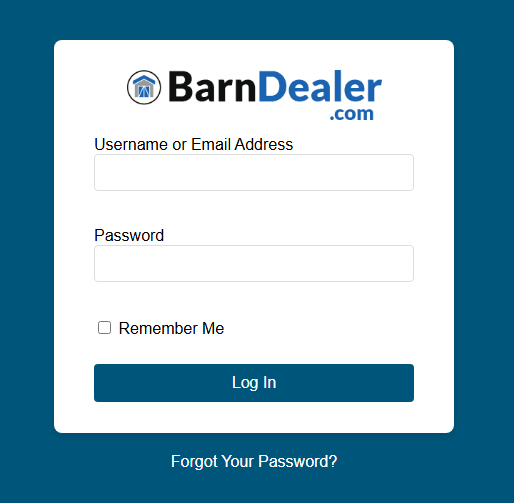
You will know you're in the correct place if your screen looks like this:
Your login isn't working.
Sometimes even if you're on the wrong site, your login can have issues working and getting you logged in.
Here are some common issues when trying to log in and how to fix them.
Search your email for "BarnDealer" and you should be able to find the welcome email with your user name and password to your website | Incorrect Username/Email | Find your Welcome email to get the username created for you when you signed up. |
| Incorrect Passoword | Look in your welcome email or reset your password using the "Forgot Your Password" button. |
| "Forgot Your Password" button not working. | check your spam email, these emails very commonly go to the spam folder of your inbox. |
Still Having Issues?
If you're still having issues getting logged into your website, feel free to contact BarnDealer Support. Email us at support@barndealer.com